A thoughtful gaming gift can fit the way someone plays, whether they spend evenings at a desk, stream with friends, or take a handheld device on the go.
These ten picks range from everyday accessories to larger setup upgrades. Check compatibility and space before choosing gear that connects to an existing system.
10 Gift Ideas for Gamers
SteelSeries Arctis Nova 7P Wireless Gaming Headset

- Works wirelessly with PC, PlayStation, Switch, or tablet using a portable USB-C dongle.
- Can mix calls or music from a mobile device with game audio.
- The retractable microphone can be tucked away for a commute.
Best Gift For: A gamer who switches between console sessions, PC play, and mobile audio.

SteelSeries Apex Pro TKL Gaming Keyboard

- Offers per-key actuation settings for customizing how keys respond.
- Two actions can be programmed to the same key.
- The tenkeyless keyboard has a detachable USB-C connection.
Best Gift For: A PC gamer who likes tailoring key response and controls to their play style.
SteelSeries Rival 5 Gaming Mouse

- Its layout has nine programmable buttons, including five quick-action side buttons.
- The optical sensor uses true one-to-one tracking.
- The mouse weighs 85g.
Best Gift For: A gamer who plays fast-paced genres and wants programmable mouse controls.
FIFINE AmpliGame AM8W XLR/USB Gaming Microphone

- Connects by USB or XLR, with USB suited to a PC and XLR to a mixer sound card.
- USB connection provides a tap-to-mute control and gain knob.
- RGB lighting can be switched or changed with a tap when using USB.
Best Gift For: A gamer who streams, records voiceovers, or starts a podcast.
HUANUO FlowLift Dual Monitor Stand

- Fits monitors measuring 13 to 32 inches, weighing 4.4 to 19.8 lbs, with VESA mounting holes at 75x75mm or 100x100mm.
- The arms allow tilt, swivel, and rotation adjustments.
- Built-in cable management guides wires along the arms.
Best Gift For: A gamer with two compatible monitors who wants more room on the desk.
TP-Link Archer AXE75 WiFi 6E Router

- Tri-band WiFi 6E supports 6 GHz, 5 GHz, and 2.4 GHz bands.
- The router supports OneMesh when connected to a TP-Link OneMesh extender.
- A modem is required for most internet service providers.
Best Gift For: A gamer looking to refresh a home network for gaming and streaming.
Valerion VisionMaster Pro2 Triple Laser Projector
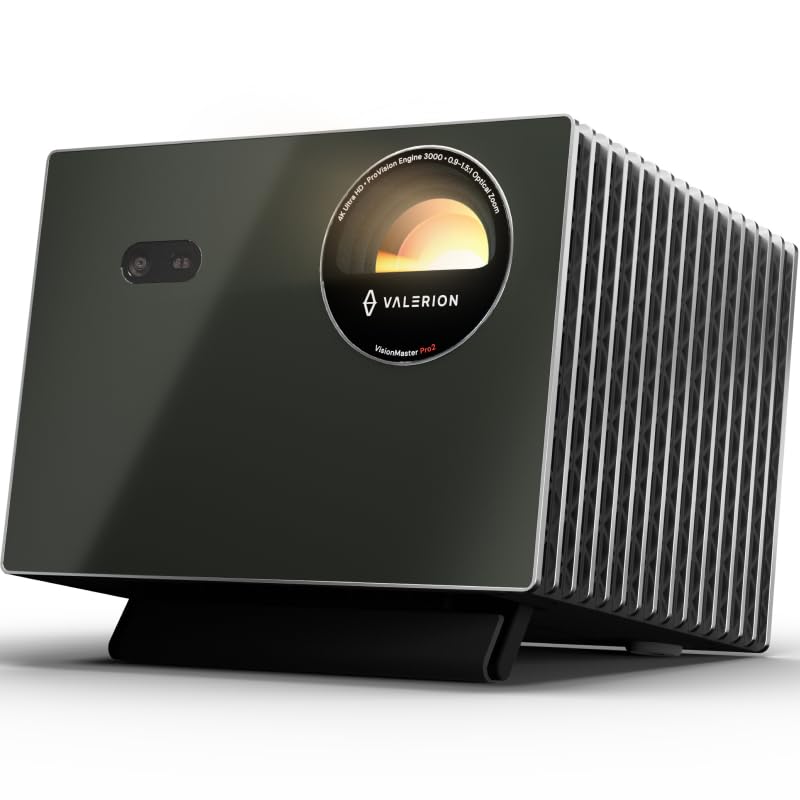
- Offers 4K UHD clarity with AI Super Resolution.
- The lens system has a 0.9–1.5 throw ratio and auto-adjusting focus and keystone correction.
- Built-in Google TV+ provides access to streaming platforms including Netflix, YouTube, Amazon Prime Video, and Disney+.
Best Gift For: A gamer who wants a large-screen option for games and movie nights.
Nylavee Computer Speakers with 6 Lighting Modes

- The speakers have six touch-controlled lighting modes.
- A single knob controls power and volume.
- They connect through a 3.5mm audio cable and use USB for power.
Best Gift For: A gamer who wants desktop speakers for games, videos, and music.
SABRENT USB-C 6-Port Hub and M.2 SSD Dock

- The hub includes an HDMI 2.0 port for an external display.
- It has three USB Type-A ports for peripherals.
- The internal M.2 slot supports SATA or NVMe SSDs in 2242, 2260, or 2280 form factors.
Best Gift For: A handheld PC gamer who wants a hub for connecting peripherals and an external display.
5000mAh Slim Magnetic Power Bank

- The 5000mAh magnetic charger is designed for MagSafe-compatible iPhones.
- Its USB-C output can charge a second device by cable while wireless charging is in use.
- It is 11.8mm thick.
Best Gift For: A mobile gamer with a compatible MagSafe iPhone who wants backup power while away from an outlet.
Choosing gifts for gamers by play style
When choosing gifts for gamers, start with how the person actually plays. A console player who moves between rooms may value an easy-to-carry audio setup, while someone who streams or plays on a desktop may appreciate controls and sound gear that stay within reach.
Think about the setup they already own before choosing anything that connects to it. A headset or mouse has to suit their preferred platform and grip, while a monitor stand needs compatible screens and a desk that can accommodate its mount.
For a household with several players or devices, consider whether the gift fits shared use. A network or display upgrade may benefit movie nights as well as gaming, while a small accessory can be a more personal match for one person’s routine.
Set a comfortable budget for gaming gifts
The range here runs from modest desk accessories to major entertainment upgrades, so decide on a comfortable spending level before comparing options. A small add-on can feel thoughtful when it solves a daily annoyance; a larger purchase makes more sense when you know it fills a specific gap.
For a lower-commitment gift, look at compact gear that adds a practical touch to a desk or mobile setup. Before buying, check compatibility, dimensions, and the current price.
For larger upgrades, confirm the recipient wants that type of change and has room for it.
If you are coordinating with family or friends, pooling contributions can make a bigger setup gift manageable. A shared plan is especially useful for equipment that depends on other gear, such as a display accessory or home network component.
Personalize gifts for gamers with their setup in mind
Small details can make gifts for gamers feel carefully chosen. Match colors to the desk or room where they play, or choose a feature that reflects what they enjoy most, such as flexible controls, a tidier surface, or a more social streaming setup.
Pay attention to the way they describe everyday frustrations. They might mention tangled cables, limited desk space, or wanting to play from a different spot.
Those clues can guide you toward a useful gift without assuming they want the newest or most elaborate gear.
Presentation can add warmth without complicating the gift. Pair a desk accessory with a handwritten note about the person’s favorite game night, or wrap a larger item with a simple card explaining why you thought it suited their routine.
Pick gaming gear that fits the room
Measure the available space before choosing anything that occupies a desk or changes how screens are arranged. For mounting equipment, verify the desk construction, thickness, monitor size, weight, and mounting pattern against current product details.
Compatibility deserves a quick check for connected gear, too. Confirm the recipient’s platform, ports, and device requirements, especially for accessories intended to connect a handheld computer, phone, or existing home network.
If you are unsure, a gift receipt can make an ambitious upgrade less stressful.
Consider the room as well as the player. Speakers and projection can work well where there is space to enjoy shared entertainment, while a smaller accessory may suit a compact desk or a home where others need quiet.
Last-minute gifts for gamers: check details before checkout
For a last-minute choice, prioritize gifts that you can match confidently to a device or routine you already know. Check the product’s current compatibility details, dimensions, and delivery estimate before placing an order; timing and availability can change.
A simpler accessory may be easier to choose quickly than a major setup change. If a gift depends on several specifications or an existing component, pause to verify them rather than guessing.
That short check can prevent a well-meant present from becoming a return task.
If delivery timing is uncertain, you can still make the gift feel considered with a note describing the gaming setup idea and a plan to choose the exact item together. Keep the note specific to the person’s interests, and let them have a say in compatibility-sensitive purchases.