A thoughtful home office upgrade can make daily work feel a little easier, whether the recipient spends their time on calls, creative projects, or focused desk work.
These nine gift ideas cover audio, workspace adjustments, connectivity, and cable organization, with options for different setups and gifting budgets.
9 Home Office Tech Gift Ideas for Remote Workers and Desk Setups
JLab Go Work Wireless Headset (1 Pack)

- Bluetooth multipoint connects to two devices simultaneously for quick switching between a computer and mobile device.
- The headset offers 45+ hours of playtime on one charge.
- A red LED on the boom microphone indicates when mute is on.
Best Gift For: A remote worker who switches between a laptop and phone during calls.

FIFINE T669 USB Microphone Kit

- The USB microphone connects directly to a PC or laptop without additional hardware or drivers.
- The kit includes an adjustable boom arm with a 30-inch reach.
- A double pop filter helps minimize popping sounds in recordings.
Best Gift For: A home creator who records podcasts, voiceovers, or online calls at a desk.
HUANUO FlowLift Dual Monitor Stand

- Each arm supports monitors weighing from 4.4 to 19.8 pounds.
- The mount fits screens from 13 to 32 inches with compatible VESA mounting holes.
- Built-in cable management guides cords along the arms.
Best Gift For: A home worker with two compatible monitors who wants more desk space and flexible screen positioning.
TP-Link Archer AXE75 WiFi 6E Router

- Tri-band WiFi 6E includes a 6 GHz band for more bandwidth.
- OneMesh support can connect with a TP-Link OneMesh extender for whole-home coverage.
- A modem is required for most internet service providers.
Best Gift For: Someone upgrading a home network used for video calls, streaming, and online work.
SteelSeries Apex 3 RGB Gaming Keyboard

- Whisper-quiet switches are designed for nearly silent use.
- The keyboard includes a magnetic wrist rest for palm support.
- Dedicated multimedia controls adjust volume and settings.
Best Gift For: A desk worker who enjoys a quieter keyboard and a wrist rest for longer typing sessions.
Audioengine A2+ Wireless Computer Speakers

- The powered speakers are designed for nearfield listening on desks.
- Bluetooth and wired inputs support connections to computers and other audio sources.
- An integrated 24-bit DAC connects to a computer through USB-C.
Best Gift For: A music lover who wants desktop speakers for listening, calls, or games.
Nulaxy Pull-Out Height Adjustable Laptop Stand

- The stand fits laptops from 10 to 17 inches.
- Its height adjusts from 1.2 to 20 inches.
- The stand supports up to 22 pounds.
Best Gift For: A laptop user who wants to adjust screen height between seated and standing desk work.
Sleek Socket Flat Outlet Concealer Kit, 3 ft
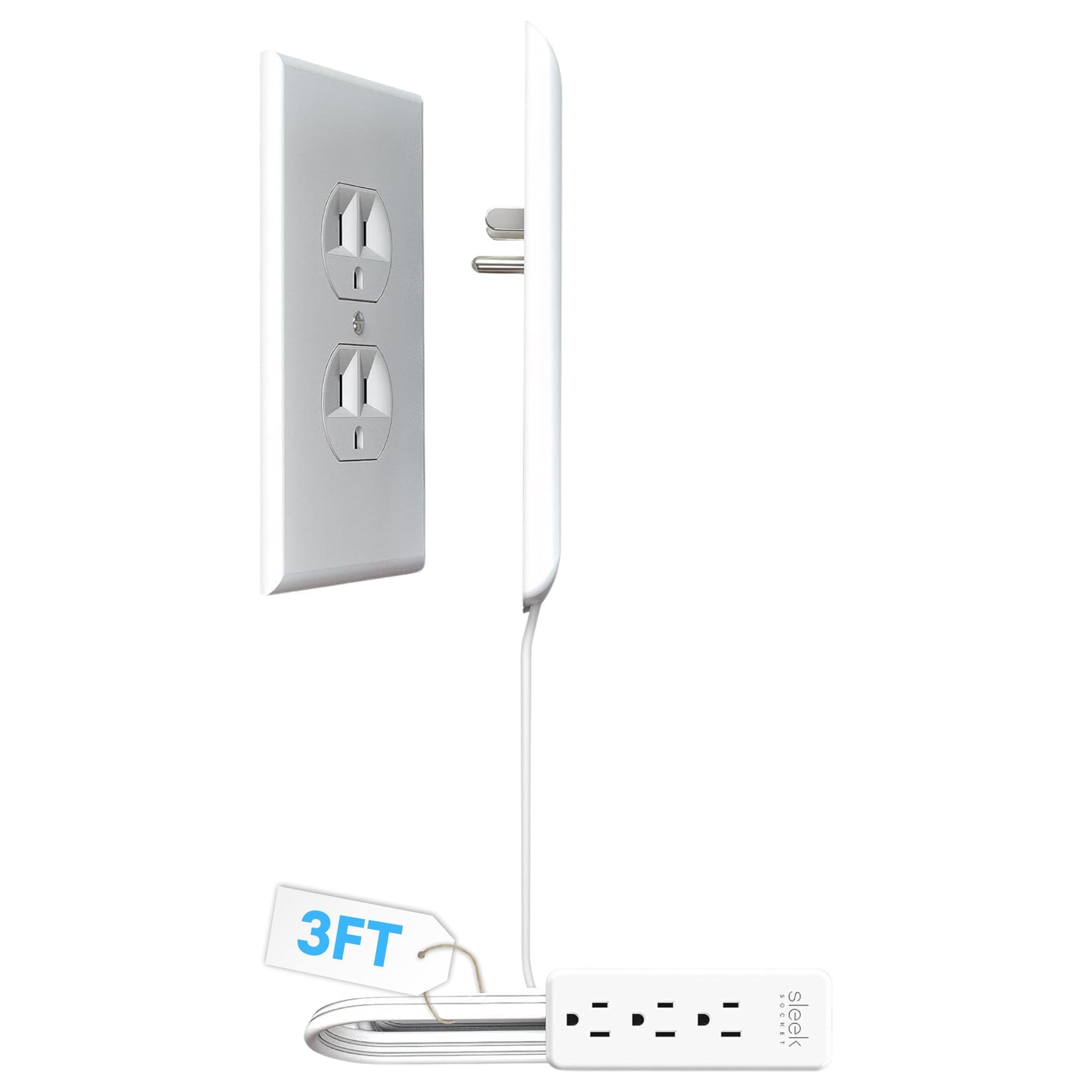
- The kit includes a 3-foot extension cord and a 3-outlet power strip.
- Adhesive clips and removable strips help secure the cord along a wall.
- It attaches to the top receptacle of a duplex outlet without tools.
Best Gift For: Someone who wants to tidy cords around a desk near a standard duplex outlet.
SABRENT USB-C 6-Port Hub & M.2 SSD Dock

- The hub has an HDMI 2.0 port for an external display at up to 4K@60Hz on a compatible device.
- Its M.2 slot supports SATA or NVMe SSDs.
- The integrated USB-C cable connects at 10Gbps.
Best Gift For: A laptop user who needs connections for peripherals, an external display, and extra storage.
Choosing home office tech gifts for their actual workday
When choosing home office tech gifts, start with the recipient’s daily routine. Someone who spends hours on video calls may appreciate a headset or microphone, while a person who works across documents and spreadsheets may get more use from a monitor setup or laptop stand.
Think about which small friction comes up repeatedly in their day.
Look at the space as well as the person. A tidy desk with one laptop has different needs from a two-screen workstation, and a shared room may call for quieter equipment or discreet cable management.
If you can, notice what they already own and what sits unused before choosing another accessory.
Check compatibility before buying anything that connects to their setup. For a monitor mount, confirm screen size, weight, mounting holes, and desk construction; for a hub, check the computer’s ports and display support.
A router or keyboard may also depend on how their home network or computer is configured.
Balance the budget with daily usefulness
Set a comfortable budget first, then focus on how often the gift will be used. A modest desk accessory that solves a daily annoyance may feel more thoughtful than a costly upgrade that does not fit the recipient’s setup.
Practical gifts work best when the connection to their routine is clear.
For home office tech gifts at different budget levels, consider whether the recipient needs a small organizational improvement, a more capable connection point, or a larger workspace upgrade. The larger the device, the more important it is to confirm compatibility and available desk space before you commit.
Check actual prices before choosing, since they can change. For a higher-cost purchase, compare the features they would use with what they already have, and leave room in your budget for any separately needed accessories or compatible components.
Personalize the setup and presentation
A useful gift can still feel personal. Match it to the recipient’s habits: music during focused work, frequent calls with clients, a compact desk in a shared room, or a laptop they move between workspaces.
A short note explaining why you chose it can make a practical item feel considered.
For home office tech gifts, presentation can acknowledge the way the person works. Pair an accessory with a handwritten message about the project or routine it supports, or wrap a small item alongside a favorite snack or notebook.
Keep the add-on simple so the main gift stays useful rather than turning into clutter.
If you are unsure about a technical detail, include a gift receipt and make the choice easy to exchange. You can also ask a partner or colleague who knows the recipient’s equipment, especially when a gift depends on monitor dimensions, computer ports, or a particular desk arrangement.
Make the gift easy to set up
Last-minute buying still benefits from a quick compatibility check. Search the recipient’s device model or ask them to verify the connection they use, then compare that with the product’s supported ports or setup requirements.
For larger desk equipment, confirm that the workspace can accommodate the mount or stand.
Before placing an order, check the current price, product details, and delivery estimate for the recipient’s location. Delivery timing can vary, so keep a backup plan such as a card describing the gift if the item is delayed.
Avoid promising a specific arrival date until you have confirmed the estimate.
For a gift that needs installation or setup, consider adding a note offering to help arrange it together. That can be especially helpful when the recipient needs to move monitors, connect a hub, or reorganize cables.
A simple offer makes a practical present easier to enjoy from the start.
Choose a home office tech gift they will use
Take one final look at the shortlist through the recipient’s point of view: does it fit their equipment, solve a real inconvenience, and suit the space where they work? If the answer is yes, a functional gift can support both comfort and focus without requiring a dramatic desk overhaul.
Keep the final choice proportional to what you know. When details are uncertain, choose a flexible accessory, verify the current product information, or leave room for an exchange.
When you know their setup well, a more specific upgrade can show that you noticed what would make their workday smoother.
A thoughtful home office present does not have to transform a whole room. It can make calls easier to manage, free up a little desk space, or keep a useful connection within reach.
Choose with care, present it warmly, and let the recipient decide how it fits into their routine.